Field Attributes
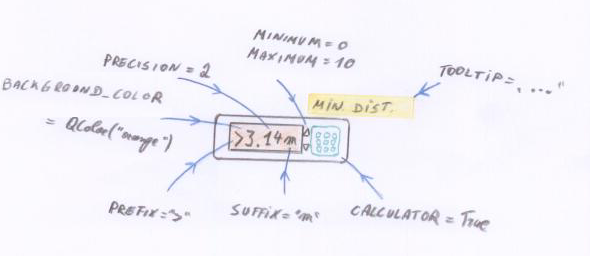
Field attributes are the most convenient way to customize an application, they can be specified through the field_attributes dictionary of an Admin class :
class VisitorReport(Entity):

    __tablename__ = 'visitor_report'

    date = Column( sqlalchemy.types.Date,
                   nullable = False,
                   default = datetime.date.today )
    visitors = Column( sqlalchemy.types.Integer,
                       nullable = False,
                       default = 0 )
    movie = ManyToOne( 'Movie', required = True )
# end visitor report definition

    class Admin(EntityAdmin):
        verbose_name = _('Visitor Report')
        list_display = ['movie', 'date', 'visitors']
        field_attributes = {'visitors':{'minimum':0}}
Each combination of a delegate and an editor used to handle a field supports a different set of field attributes. To know which field attribute is supported by which editor or delegate, have a look at the Delegates documentation.
Static Field Attributes
Static field attributes should be the same for every row in the same column, as such they should be specified as constant in the field attributes dictionary.
Dynamic Field Attributes
Some field attributes, like background_color, can be dynamic. This means they can be specified as a function in the field attributes dictionary.
This function should take as its single argument the object on which the field attribute applies, as can be seen in the background color example
These are the field attributes that can be dynamic:
- camelot.admin.object_admin.DYNAMIC_FIELD_ATTRIBUTES = ['tooltip', 'color', 'background_color', 'editable', 'choices', 'prefix', 'suffix', 'new_message', 'nullable', 'precision', 'directory', 'visible', 'validator']
Overview of the field attributes
address_validator
A function that verifies if a virtual address is valid, and eventually corrects it. The default implementation can is camelot.view.controls.editors.virtualaddresseditor.default_address_validator()
This function will be called while the user is editing the address, therefor it should take very little time to do the validation. If the address is invalid, this will be shown to the user, but it will not block the input of the address.
calculator
True or False Indicates whether a calculator should be available when editing this field.
create_inline
used in a one to many relation, if False, then a new entity will be created within a new window, if True, it will be created as a new line in the table.
column_width
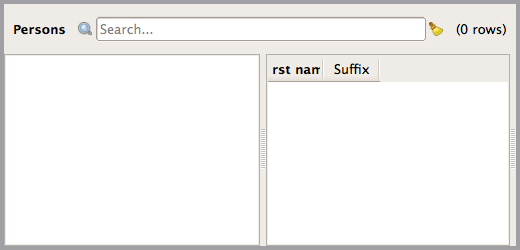
An integer forcing the column width of a field in a table view. The use of this field attribute is not recommended, since in most cases Camelot will figure out how wide a column should be. The use of minimal_column_width is advised to make sure a column has a certain width. But the column_width field attribute can be used to shrink the column width to arbitrary sizes, even if this might make the header unreadeable.
            field_attributes = { 'first_name':{'column_width':8},
                                 'suffix':{'column_width':8},}
directory
True or False indicates if the file editor should point to a directory instead of a file. By default it points to a file.
field_name
This is the object name of the QtGui.QWidget that will be used as an editor for this field.
file_filter
When the user is able to select a file or filename, use this filter to limit the available files.
length
The maximum number of characters that can be entered in a text field.
minimum
The minimum allowed value for Integer and Float delegates or their related delegates like the Star delegate.
maximum
The maximum allowed value for Integer and Float delegates or their related delegates like the Star delegate.
precision
The numerical precision that will be used to display Float values, this is unrelated to the precision in which they are stored.
choices
A function taking as a single argument the object to which the field belongs. The function returns a list of tuples containing for each possible choice the value to be stored on the model and the value displayed to the user.
The use of choices forces the use of the ComboBox delegate:
field_attributes = {'state':{'choices':lambda o:[(1, 'Active'),
                                                 (2, 'Passive')]}}
minimal_column_width
An integer specifying the minimal column width when this field is displayed in a table view. The width is expressed as the number of characters that should fit in the column:
field_attributes = {'name':{'minimal_column_width':50}}
will make the column wide enough to display at least 50 characters. The user will still be able to reduce the column size manually.
prefix
String to display before a number
remove_original
True or False
Set to True when a file should be deleted after it has been transfered to the storage.
single_step
The size of a single step when the up and down arrows are used in on a float or an integer field.
stretch
Relative size of the editor with respect to the other editors in the same layout. This should be an integer number.
suffix
String to display after a number
tooltip
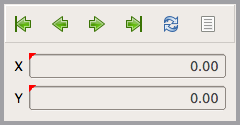
A function taking as a single argument the object to which the field belongs. The function should return a string that will be used as a tooltip. The string may contain html markup.
from camelot.admin.object_admin import ObjectAdmin
from camelot.view.controls import delegates

def dynamic_tooltip_x(coordinate):
  return u'The <b>x</b> value of the coordinate, now set to %s'%(coordinate.x)

def dynamic_tooltip_y(coordinate):
  return u'The <b>y</b> value of the coordinate, now set to %s'%(coordinate.y)

class Coordinate(object):

  def __init__(self):
    self.id = 1
    self.x = 0.0
    self.y = 0.0

  class Admin(ObjectAdmin):
    form_display = ['x', 'y',]
    field_attributes = dict(x=dict(delegate=delegates.FloatDelegate,
                                   tooltip=dynamic_tooltip_x),
                            y=dict(delegate=delegates.FloatDelegate,
                                   tooltip=dynamic_tooltip_y),
                            )
    form_size = (100,100)
translate_content
True or False
Wether the content of a field should be translated before displaying it. This only works for displaying content, not while editing it.
background_color
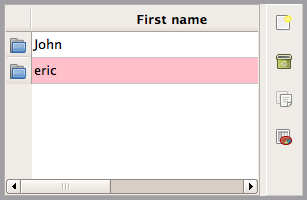
A function taking as a single argument the object to which the field belongs. The function should return None if the default background should be used, or a QColor to be used as the background.
"""This Admin class turns the background of a Person's first
name pink if its first name doesn't start with a capital"""

from camelot.core.qt import QtGui
from camelot.model.party import Person

def first_name_background_color(person):
    import string
    if person.first_name:
        if person.first_name[0] not in string.uppercase:
            return QtGui.QColor('pink')

class Admin(Person.Admin):
    field_attributes = {'first_name':{'background_color':first_name_background_color}}
name
The name of the field used, this defaults to the name of the attribute
target
In case of relation fields, specifies the class that is at the other end of the relation. Defaults to the one found by introspection. This can be used to let a many2one editor always point to a subclass of the one found by introspection.
admin
In case of relation fields, specifies the admin class that is to be used to visualize the other end of the relation. Defaults to the default admin class of the target class. This can be used to make the table view within a one to many relation look different from the default table view of a class.
from sqlalchemy import schema, types

from camelot.admin.entity_admin import EntityAdmin
from camelot.core.orm import ManyToMany, Entity
from camelot.model.party import Person

class PersonOnMailingGroupAdmin(EntityAdmin):
    list_display = ['first_name', 'last_name', 'street1', 'city']

class MailingGroup(Entity):
    name = schema.Column(types.Unicode(30), nullable=False)
    persons = ManyToMany(Person)

    class Admin(EntityAdmin):
        list_display = ['name']
        form_display = ['name', 'persons']
        field_attributes = {'persons': {'admin': PersonOnMailingGroupAdmin}
                            }
address_type
Should be None or one of the Virtual Address Types, like ‘phone’ or ‘email’. When specified, it indicates that a VirtualAddressEditor should only accept addresses of the specified type.
Customizing multiple field attributes
When multiple field attributes need to be customized, specifying the field_attributes dictionary can become inefficient.
Several methods of the camelot.admin.object_admin.ObjectAdmin class can be overwritten to take care of this.
Instead of filling the field_attributes dictionary manually, the :method:`camelot.admin.object_admin.ObjectAdmin.get_field_attributes` method can be overwritten :
When multiple dynamic field attributes need to execute the same logic to determine their value, it can be more efficient to overwrite the method :method:`camelot.admin.object_admin.ObjectAdmin.get_dynamic_field_attributes` and execute the logic once there and set the value for all dynamic field attributes at once.
The complement of get_dynamic_field_attributes is :method:`camelot.admin.object_admin.ObjectAdmin.get_static_field_attributes`.